Webflow AB Testing is the fastest way to improve a website using real user behavior instead of opinions. When visitors land on your site, every small detail shapes what they do next. Our guide will explain Webflow AB Testing in a clear, practical way so you can improve results step by step without confusion or guesswork.
Our article is written for individuals seeking clear answers and steady growth. You will learn what to test, how to test it, and how to use results to make better choices that last.
Why Webflow AB Testing is essential for website growth
Most websites struggle not because they look bad, but because they feel unclear. Visitors arrive with intent, but something stops them from moving forward. Webflow AB Testing helps you identify and resolve silent blockers by showing how real users respond to small, controlled changes.
Instead of guessing, you learn from real behavior. This makes growth predictable and sustainable.
Removes confusion from key pages
Many pages fail because users do not understand what to do next. This Testing shows where people hesitate, pause, or leave. When you test clearer layouts or simpler wording, you reduce confusion and guide users forward.
Reduces risk when making changes
Large redesigns often hurt performance before they help. With AB Testing, you test one small change at a time. This protects your existing results while still allowing improvement.
Saves time and resources
Instead of debating ideas internally, you let users decide. Testing prevents wasted effort on changes that look good but do not work.
Builds user confidence
When pages feel clear and predictable, users feel safer taking action. Over time, AB Testing makes your site easier to trust and easier to use.
Creates steady, long-term improvement
Small wins compound. A better headline today, a clearer button tomorrow, and a simpler form next week lead to strong growth over the months.
Encourages a learning mindset
Each test entertains your audience with something new. This insight is often more valuable than the test result itself. You stop guessing and start understanding real needs.
What Webflow AB Testing really means
At its core, Webflow AB Testing is a method for comparing two versions of the same page. One version stays exactly as it is. The other includes one deliberate change. Visitors are split between both versions, and their actions are measured.
The process is simple, but the value comes from discipline and focus.
Two versions, one clear difference
You always test one change at a time. This could be text, layout, color, or placement. Keeping one difference ensures clean and reliable results.
Real users make the decision
Instead of opinions, real visitors choose the winning version through their actions. Testing relies on behavior, not assumptions.
One goal per test
Every test must have a single goal. This could be more clicks, more sign-ups, or more completed actions. Clear goals make results easy to understand.
Equal traffic split
Users are evenly divided between both versions. This ensures fairness and accurate comparisons.
Results based on action, not preference
Users do not tell you what they like. They show you. Testing tracks what people actually do, which is far more reliable.
Focus keeps data trustworthy
Testing multiple changes at once leads to confusion. The core rule of Testing is focus. One change. One goal. Clear results.
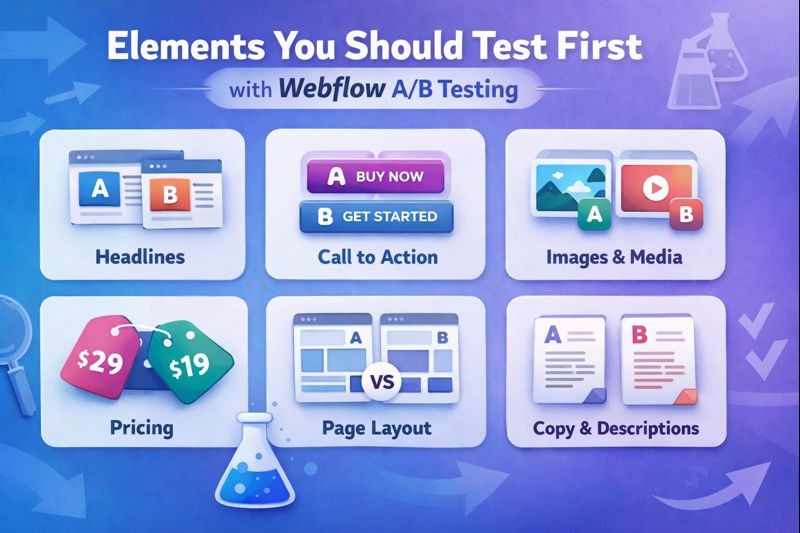
Elements you should test first with Webflow AB Testing
Not every change creates the same impact. Webflow AB Testing works best when you start with elements that shape clarity, trust, and decision-making.
These elements influence what users see first, how they feel, and whether they act.
Headlines and page messages
Headlines decide if users stay or leave within seconds. Testing headlines often brings fast insights.
Clarity vs creativity Test a clear headline that explains value against a creative one that sounds clever. Clear usually performs better because users understand it faster.
Benefit-focused wording Try headlines that explain what users gain, not what you offer. People respond better when they see personal value.
Tone and simplicity Test short and direct language against longer explanations. Simple words reduce effort and improve understanding.
Buttons and calls to action
Buttons guide users to the next step. Small changes here can create strong results in Testing.
Action-based text Test specific phrases like Get the guide or Start free instead of vague words like Submit or Click here.
Button size and spacing Larger buttons with enough space around them are easier to spot and tap, especially on mobile.
Color contrast Test a high-contrast color against a softer one. Buttons should stand out without feeling aggressive.
Placement on the page Try moving the button higher or repeating it after key content so users do not have to search for it.
Images and visuals
Images influence trust and emotion. In Webflow AB Testing, visuals should support the message, not distract from it.
Real people vs illustrations Test real photos of people against abstract graphics. Real faces often build stronger trust.
Contextual images Show images that explain the product or outcome instead of decorative visuals with no meaning.
Image position Test placing images above the fold versus within the content flow to see where they help most.
Visual clarity Clean, focused images usually perform better than busy or complex ones.
Forms and input fields
Forms are where many users stop. Webflow AB Testing helps you reduce effort and fear at this stage.
Number of fields Test fewer fields against longer forms. Less effort often leads to more completions.
Field order Place easy questions first to build momentum before asking for sensitive details.
Labels and helper text Test clear labels and short hints that explain why information is needed.
Trust signals near forms Try adding short reassurance text, such as privacy notes, to reduce hesitation.
How Webflow AB Testing Improves User Experience
User experience improves when friction disappears.Testing helps you find where users pause, hesitate, or leave.
It removes confusion
Tests reveal which layouts, words, or visuals confuse users
Clearer pages reduce mental effort and frustration
Users understand what to do without guessing
It speeds up decision-making
Simple choices help users act faster
Clear calls to action guide behavior naturally
Less thinking leads to smoother navigation
It builds confidence and comfort
Consistent results show what users trust
Familiar patterns reduce fear of mistakes
Users feel guided instead of pushed
It increases long-term engagement
Clear pages keep users on the site longer
Better flow leads to repeat visits
Positive experiences strengthen brand trust
When a test shows better results, it usually means the page has become easier to understand or use. Over time, Webflow AB Testing makes your site feel smoother, calmer, and more reliable. Users find what they need faster and feel confident taking action. This leads to longer visits, repeat users, and stronger trust in your brand.
The role of Webflow AB Testing in long-term SEO success
Search engines aim to rank pages that truly help users. Testing supports long-term SEO by improving how real people experience your site, not by chasing shortcuts.
SEO today is not just about keywords. It is about behavior. When users stay longer, scroll more, and take action, search engines read those signals as quality.
Improves user engagement signals
Testing helps improve key engagement metrics that search engines care about.
Lower bounce rates Clear layouts and messages keep users from leaving too quickly.
Longer time on page Easier reading and better structure encourage users to stay and explore.
Higher interaction rates Strong calls to action guide users to click, scroll, and engage.
These signals show that your page answers user intent, which supports stronger rankings over time.
Makes content easier to understand
Even great content can fail if it is hard to read or poorly structured. Webflow Testing helps you fix this.
Test shorter paragraphs against longer blocks
Test simple headings against complex wording
Test content to see what users read first
When content becomes easier to scan and understand, users trust it more and search engines reward it.
Supports page experience and usability
Search engines favor pages that feel smooth and helpful. Webflow Testing helps improve usability without redesigning everything.
Faster decision-making for users
Clear navigation paths
Reduced friction on key pages
Better usability leads to better experience scores, which support long-term SEO stability.
Strengthens existing content instead of replacing it
Testing does not replace good content. Testing helps strong content perform better.
Removes distractions that pull attention away
Highlights the most useful information
Guides users toward the next step
This allows your best pages to reach their full potential without rewriting everything.
Step-by-step process for Webflow AB Testing
A clear process keeps testing honest and effective. Webflow AB Testing works best when you follow the same structure every time. This creates reliable results and prevents false conclusions.
Step 1: Define one clear goal
Every test needs a single purpose.
Choose one action you want users to take
Examples include form submissions, button clicks, or page scroll depth
Avoid testing without a goal, as results become meaningless
A clear goal keeps the test focused and easy to measure.
Step 2: Study current behavior
Before making changes, understand what is already happening.
Review pages with high traffic but low conversions
Look for drop-off points where users leave
Identify confusion or hesitation areas
These pages offer the biggest opportunity for improvement through Testing.
Step 3: Create one clear change
Focus is critical in testing.
Duplicate the page inside Webflow
Change only one element
Keep layout, content, and structure the same
This ensures that results reflect the change you made, not multiple variables.
Step 4: Split traffic evenly
Fair traffic distribution keeps results accurate.
Send users evenly to both versions
Avoid manual traffic routing
Ensure both versions load equally fast
Balanced traffic ensures that results reflect real user preferences.
Step 5: Let the test run fully
Patience matters in this type of Testing.
Avoid stopping early due to excitement or fear
Let enough users interact with both versions
Wait until the results are consistent
Ending tests too soon often leads to wrong decisions.
Step 6: Apply and document results
Testing only matters if you learn from it.
Publish the winning version
Record what worked and why
Save insights for future tests
Over time, documentation reveals patterns that help you improve faster with each new test.
Common mistakes that hurt Webflow AB Testing results
Many teams use Webflow AB Testing with good intentions, but weak execution. These mistakes reduce accuracy and waste time. Knowing them helps you avoid false conclusions.
Testing pages with low traffic Pages with very few visitors do not produce reliable data. Tests take too long, and results change often. Always test pages with steady traffic so patterns appear faster and clearer.
Changing too many elements at once When headlines, buttons, and images change together, you cannot tell what caused the result. Testing works best when you change one element only and measure its impact.
Stopping tests too early Early results can be misleading. Short tests often reflect chance, not behavior. Let tests run long enough to reach stable results before deciding.
Ignoring losing test results A losing version still teaches you what users dislike or ignore. These lessons guide better ideas in future tests. Every Testing result has value if reviewed honestly.
Testing without a clear goal Running tests without a defined action leads to confusion. Always decide what success means before starting the test.
Choosing the right tools for Webflow AB Testing
Since Webflow does not include built-in testing, tools play a major role in Webflow AB Testing success. The right tool makes testing simple and reliable.
Easy traffic splitting A good tool should divide visitors evenly between page versions without errors or bias.
Clear goal tracking Tools must track specific actions such as clicks, form submissions, or purchases. Without this, results lose meaning.
Light impact on page speed Heavy scripts slow pages and affect behavior. Choose tools that load fast and keep the user experience smooth.
Simple reporting and insights Clean reports help you understand results quickly. Avoid tools that require deep analysis to read basic outcomes.
Ease of setup and use Simple tools often bring better results than complex tools used rarely. Consistency matters more than advanced features in Testing.
Best practices to get consistent wins with Webflow AB Testing
Strong results come from discipline and patience. Webflow AB Testing delivers steady growth when treated as a routine, not a one-time task.
Test one idea at a time Focus on one change and one goal. This keeps results clean and easy to trust.
Base tests on real user behavior Use data from user sessions, heatmaps, or feedback. Guessing leads to weak tests.
Keep written records of results Document each test, outcome, and insight. Over time, patterns appear that guide smarter decisions.
Repeat what works and refine it When a change wins, test it again in a new way. Small refinements often unlock more gains.
Avoid copying other websites blindly What works for another audience may fail for yours. Let Webflow AB Testing data guide every decision.
How Webflow AB Testing supports trust and credibility
Trust grows when visitors feel safe and understood. Webflow AB Testing helps you remove confusion and friction that harm credibility.
Clear page structure and flow Testing helps you find layouts that feel natural and easy to follow. Users feel guided, not pushed.
Transparent messaging When wording is clear, users know what will happen next. This reduces hesitation and builds confidence.
Consistent improvements over time Regular testing shows that the site evolves with user needs. This signals care and reliability.
Reduced frustration and doubt Pages tested with real users feel smoother. This makes visitors more likely to trust your brand and return.
Measuring success beyond simple numbers
Success is not just about higher clicks. Testing also reveals how comfortable and confident users feel.
Time spent on the page A longer time often means clearer content and better engagement.
Scroll depth and reading behavior Scroll patterns show where users stay interested or lose focus.
User pauses and hesitation points Pauses reveal confusion or decision points. These insights guide better design choices.
Consistency across visits When users return and engage again, it signals trust and satisfaction.
Better measurements lead to better pages. Over time, Webflow AB Testing helps you build stronger user relationships, not just short-term wins.
Final thoughts on Webflow AB Testing
Webflow AB Testing is most effective when it becomes part of your regular workflow. Each test helps you understand user behavior more clearly, remove weak assumptions, and make decisions based on evidence instead of opinion. Over time, this steady approach improves not just individual pages, but the overall quality and direction of your website.
When used with patience and discipline, Webflow AB Testing leads to clearer messaging, smoother navigation, and stronger user trust. Small improvements repeated consistently create lasting growth. Start simple, test with purpose, review results honestly, and let Webflow AB Testing guide your site toward reliable and meaningful success.
Have a project in mind?
Schedule a discovery call today to discuss things in more depth.






.svg)
.svg)
.svg)
.svg)
