
Integrations are becoming essential for modern websites. Businesses want their tools, content systems, and marketing platforms to work together without extra steps. That is why the latest update from Webflow is important for marketers, designers, and developers.
The company recently announced new Integrations with Adobe, Getty Images, OneTrust, and TransPerfect. These Integrations allow teams to handle creative assets, privacy compliance, personalization, and translation directly inside Webflow. Instead of switching between multiple tools, teams can manage everything from one platform and move faster while building better digital experiences.
Why Integrations Matter in Modern Website Platforms
Today’s marketing teams rely on a range of digital tools to run their websites and campaigns. They use content systems, analytics dashboards, privacy tools, design platforms, and marketing software. When these systems are not connected, teams must switch between platforms and manually move data between them. Without strong Integrations, this process wastes time and increases the risk of errors.
Modern website platforms are now expected to connect smoothly with other tools. This is why Integrations have become a major factor when businesses choose a website platform. Webflow is addressing this need by expanding its ecosystem of Integrations, allowing companies to connect essential tools and manage their workflows from a single environment.
With the right Integrations, teams can work more efficiently and focus on creating better digital experiences instead of managing disconnected systems.
Before understanding the full impact, it helps to look at the main reasons why Integrations are so valuable in modern website management.
Key reasons why Integrations matter include:
- Centralized workflow: When tools are connected through Integrations, teams can manage design, marketing, analytics, and content within one platform. This reduces the need to open multiple dashboards and improves team productivity.
- Faster production: Designers and marketers can move quickly when assets, data, and publishing tools are connected. Integrations help reduce delays caused by manual tasks such as copying files or transferring data.
- Better data usage: Marketing platforms collect valuable audience insights. With proper Integrations, this data can be used directly in websites to personalize user experiences and improve marketing performance.
- Improved compliance: Privacy and consent regulations require careful data management. Compliance Integrations can automate consent banners, cookie tracking, and user preferences, helping businesses follow global data laws.
- Global scalability: Businesses expanding into international markets need translation and localization tools. Through multilingual Integrations, companies can launch global websites faster and maintain consistent messaging.
As digital marketing becomes more complex, companies need systems that work together seamlessly. Strong Integrations allow businesses to maintain control over their content, marketing strategies, and customer experiences without increasing operational complexity.
Overview of Webflow’s New Integrations
To support modern website workflows, Webflow has introduced several new Integrations with leading technology providers. These partnerships bring powerful capabilities directly into the Webflow environment, allowing teams to manage multiple aspects of website creation without leaving the platform.
The latest Integrations focus on four key areas that businesses depend on: marketing personalization, visual content creation, privacy compliance, and global website localization. By connecting these services directly to Webflow, companies can streamline operations and improve collaboration between teams.
Below is a quick overview of the new Integrations and the value they bring to businesses.
Each of these Integrations addresses a different challenge that modern businesses face when building and managing websites. Adobe helps teams create personalized user experiences based on marketing data. Getty Images gives designers quick access to professional visuals. OneTrust helps companies meet privacy requirements, while TransPerfect enables fast translation and localization for international markets.
Together, these Integrations make Webflow more powerful as a complete website platform. Marketing teams can handle personalization, design resources, compliance, and global expansion directly within Webflow, reducing friction in their daily workflows and allowing teams to focus on creating better online experiences.
Integration with Adobe for Smarter Personalization
One of the most powerful Integrations introduced by Webflow is its partnership with Adobe. Personalization is now a key part of digital marketing, and businesses want websites that respond to visitor behavior. Through these Integrations, Webflow users can connect their websites with Adobe’s marketing tools to create more targeted and data-driven experiences.
This integration allows marketing teams to use real customer insights while designing and managing websites. Instead of treating every visitor the same, businesses can adjust content based on audience data, campaign activity, and user behavior.
These Integrations help connect design workflows with marketing intelligence, which allows companies to create more relevant website experiences for their audiences.
How the Adobe Integration Works
The Adobe connection allows Webflow to access valuable marketing data collected from campaigns and customer interactions. This information helps businesses personalize content and improve website performance.
Through these Integrations, teams can use data such as:
- Campaign engagement data
Marketers can see how users interact with ads, emails, and landing pages. - Audience segmentation insights
Adobe groups users into segments based on interests, demographics, and behavior. - Customer journey tracking
Teams can understand how visitors move across pages and campaigns. - Form submission data
Lead information collected through forms helps refine marketing strategies. - User browsing behavior
Website activity, such as clicks, time spent on pages, and repeat visits, can guide personalization. - Marketing campaign performance metrics
Data from campaigns can help teams improve messaging and targeting.
These Integrations allow marketing teams to adjust website content dynamically. For example:
- Visitors arriving from a specific marketing campaign can see a customized landing page.
- Returning visitors may see recommendations based on previous browsing activity.
- Different audience segments can see different messages or offers.
Benefits of the Adobe Integration
For large marketing teams and enterprises, this is one of the most strategic Integrations Webflow offers. It connects website design with advanced marketing insights.
Key benefits include:
- Personalized user journeys
- Show content based on visitor interests
- Create targeted landing pages for campaigns
- Deliver relevant product or service recommendations
- Better marketing insights
- Understand how audiences interact with website content
- Track campaign performance across multiple channels
- Analyze user engagement with different pages
- Improved conversion rates
- Personalized experiences encourage visitors to take action
- Targeted messaging increases form submissions and sign-ups
- Campaign-based landing pages improve lead generation
- More effective A/B testing
- Test different versions of web pages
- Measure performance using real audience data
- Identify the best-performing design or content strategy
- Stronger collaboration between teams
- Designers and marketers work using the same insights
- Marketing data guides website design decisions
- Teams can respond faster to campaign results
Overall, these Integrations combine Webflow’s design flexibility with Adobe’s marketing intelligence. Businesses can build smarter websites that respond to audience behavior and deliver more meaningful digital experiences.
Getty Images Integration for High-Quality Visual Content
Visual content plays a huge role in how visitors experience a website. High-quality images help communicate ideas faster, capture attention, and strengthen brand identity. However, finding professional images can slow down the design process.
This is where the new Integrations with Getty Images become extremely valuable. Getty Images is one of the world’s largest professional image libraries, offering millions of licensed photos, illustrations, and creative assets.
With this integration, Webflow designers can search and add professional visuals directly inside the platform without leaving their design workspace.
Key Features of the Getty Images Integration
The Getty Images partnership introduces several useful features that make website design faster and more efficient.
Through these Integrations, users can:
- Search images directly inside Webflow
- Browse millions of Getty Images assets
- Filter results by topic, style, or category
- Preview images before adding them to a page
- Add licensed visuals instantly
- Place images directly into page layouts
- Use visuals without manual downloading
- Maintain proper image licensing
- Access multiple types of creative assets
- High-resolution photos
- Professional illustrations
- Editorial and lifestyle images
- Vectors and creative graphics
- Improve design workflow
- Designers stay inside Webflow during the entire process
- No need to upload files manually
- Faster page creation and updates
Advantages of Visual Asset Integrations
Design teams often spend hours searching for images across different platforms. They may also need to download files, manage licenses, and upload assets manually.
This is why visual asset Integrations significantly improve productivity.
Major advantages include:
- Faster design workflow
- Designers find images while building pages
- Less time spent switching between platforms
- Faster completion of design tasks
- High-quality licensed imagery
- Professional visuals improve brand perception
- Websites look more polished and credible
- Access to trusted image sources
- Stronger brand storytelling
- Teams can select visuals that match the brand tone
- Consistent imagery across all website pages
- Better communication of brand values
- Reduced production time
- No need to search multiple stock photo sites
- Instant placement of visuals into layouts
- Faster publishing of content and landing pages
- Better collaboration between teams
- Designers and marketers use the same image library
- Content teams can easily suggest visuals
- Projects move forward with fewer delays
For marketing agencies, content creators, and in-house design teams, this integration removes a major obstacle in the website creation process. Instead of wasting time on asset management, teams can focus on building engaging pages and telling stronger visual stories.
With these Integrations, Webflow continues to expand its ecosystem and provide tools that help businesses design better websites with greater speed and efficiency.
OneTrust Integration for Privacy and Consent Compliance
Privacy regulations are becoming stricter across the world. Governments and regulatory bodies now require businesses to handle customer data carefully and clearly explain how information is collected and used. Because of this, websites must provide transparent consent options and follow strict data protection rules.
The partnership between Webflow and OneTrust helps solve this challenge. Through these Integrations, Webflow users can manage privacy, cookie consent, and user data preferences directly within their websites.
Instead of relying on separate privacy tools or complicated scripts, businesses can now implement trusted compliance solutions directly in Webflow. These Integrations make it easier for companies to follow global privacy laws while maintaining a smooth user experience.
What the OneTrust Integration Does
The OneTrust connection allows Webflow websites to include advanced privacy and consent management tools. These features help businesses meet legal requirements while giving users more control over their personal data.
Through these Integrations, website owners can manage several privacy functions, including:
- Cookie consent banners
- Display cookie consent notices to website visitors
- Allow users to accept or reject tracking cookies
- Customize banner design to match website branding
- Data privacy management
- Control how visitor data is collected and stored
- Manage tracking scripts and third-party services
- Ensure proper handling of personal information
- User preference tracking
- Let visitors choose what types of cookies they allow
- Store consent preferences for future visits
- Update consent settings easily when policies change
- Compliance with global regulations
- Automated consent enforcement
- Prevent tracking tools from running before consent
- Activate scripts only after users agree to data collection
- Ensure privacy rules are consistently applied
With these Integrations, businesses can build websites that respect user privacy while remaining compliant with international regulations.
How the OneTrust Integration Improves Website Compliance
Managing privacy compliance manually can be difficult, especially for companies that operate across multiple countries. The OneTrust integration adds a powerful privacy layer to Webflow websites and helps automate many compliance tasks.
This solution ensures that tracking scripts, analytics tools, and marketing tags operate according to user consent settings.
Key benefits include:
- Automatic consent management
- Consent banners appear automatically when users visit the website
- User preferences are stored and applied across sessions
- Cookie settings can be updated anytime by visitors
- Reduced legal risk
- Businesses follow recognized privacy frameworks
- Compliance processes become easier to manage
- The risk of regulatory penalties is lowered
- Transparent user data handling
- Visitors clearly see how their data is used
- Consent options are simple and easy to understand
- Privacy policies can be displayed alongside consent tools
- Improved trust with visitors
- Transparent data practices build confidence
- Users feel safer sharing information
- Businesses demonstrate responsibility toward customer data
- Simplified compliance workflows
- Privacy controls operate automatically
- Marketing teams do not need to manage scripts manually
- Compliance teams can monitor privacy settings more easily
As privacy regulations continue to evolve, compliance Integrations like OneTrust will become even more important. Businesses that adopt these tools early can protect their users, maintain regulatory compliance, and build stronger trust with their audiences.
TransPerfect Integration for Global Website Localization
Many businesses want to expand beyond their local markets and reach international audiences. However, launching websites in multiple languages is often complicated. Companies must translate large amounts of content, manage updates across languages, and maintain consistent messaging.
The new partnership between Webflow and TransPerfect helps solve these challenges. Through these Integrations, Webflow connects with professional translation and localization tools that simplify global website management.
This integration allows businesses to translate website content faster and launch multilingual websites without complex manual processes.
How TransPerfect GlobalLink Works
TransPerfect offers a localization platform called GlobalLink. This system helps companies manage translation projects and maintain consistency across multiple languages.
Through these Integrations, Webflow users can handle several localization tasks more efficiently.
Key capabilities include:
- Automatic website content translation
- Translate website pages into multiple languages
- Send content directly from Webflow to translation workflows
- Receive translated content ready for publishing
- Multilingual workflow management
- Track translation progress for different languages
- Manage updates across global websites
- Keep content synchronized across regions
- Faster website localization
- Reduce manual copy-paste translation work
- Automate content transfer between systems
- Publish localized pages more quickly
- Consistent messaging across languages
- Maintain brand tone in every language
- Ensure accurate translations across pages
- Avoid content inconsistencies between regions
- Centralized translation management
- Handle multiple language versions in one system
- Coordinate translators, editors, and marketing teams
- Simplify global content updates
These Integrations help businesses manage multilingual websites with greater efficiency and accuracy.
Benefits of Localization Integrations
For companies targeting global audiences, localization tools are essential. Without proper translation workflows, international website management becomes slow and expensive.
Localization integrations, like the TransPerfect partnership, bring several advantages.
Major benefits include:
- Faster global website launches
- Translate large websites more quickly
- Launch new regional versions with minimal delay
- Expand into new markets faster
- Consistent translations across pages
- Maintain uniform terminology and messaging
- Reduce translation errors across languages
- Protect brand identity in global markets
- Reduced localization costs
- Automate translation workflows
- Minimize manual editing and content duplication
- Reduce operational overhead for global teams
- Better international customer engagement
- Visitors prefer content in their native language
- Localized websites improve user experience
- Businesses build stronger connections with global audiences
- Simplified global content management
- Update multiple language versions simultaneously
- Manage translation tasks through centralized systems
- Improve coordination between global marketing teams
For companies planning international growth, these Integrations make it much easier to manage multilingual websites directly from Webflow.
By combining Webflow’s flexible design tools with TransPerfect’s localization expertise, businesses can expand globally while maintaining clear messaging and consistent brand experiences across different languages and regions.
How These Integrations Improve Marketing Workflows
Modern marketing teams depend on many digital tools to manage campaigns, design assets, customer insights, and compliance requirements. In many organizations, these tools operate separately. As a result, teams often switch between multiple dashboards, copy data manually, and coordinate across different platforms.
This fragmented workflow can slow down projects and create unnecessary complexity. That is why strong Integrations are becoming essential for modern website platforms.
By introducing new Integrations with Adobe, Getty Images, OneTrust, and TransPerfect, Webflow helps marketing teams connect key systems directly within the website environment. Instead of managing disconnected tools, teams can now handle many important tasks from a single platform.
These Integrations simplify workflows, reduce manual work, and allow teams to focus on strategy, creativity, and user experience.
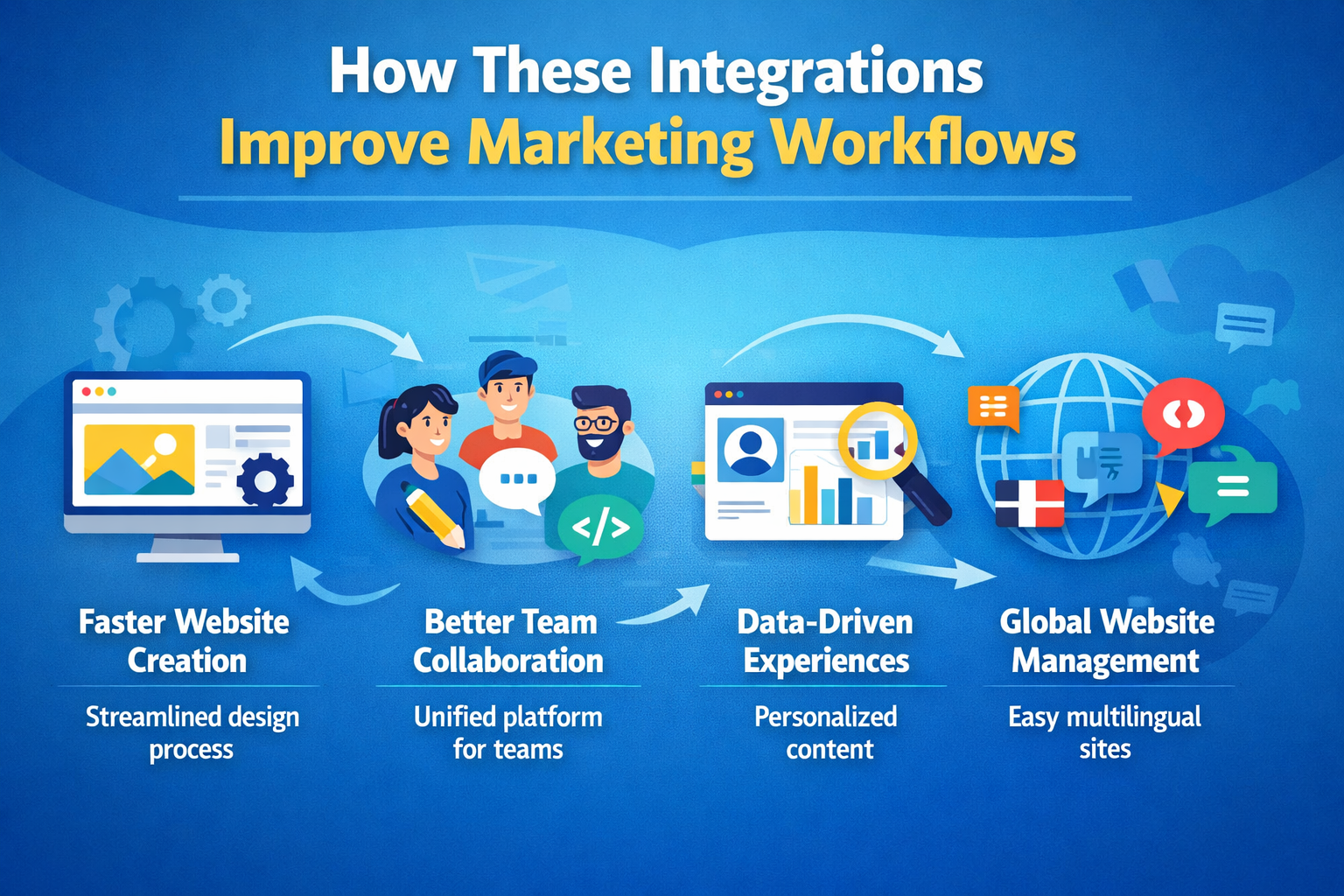
Below are the major ways these Integrations improve marketing workflows.
1. Faster Website Creation
Creating a modern website requires multiple resources such as images, campaign data, privacy tools, and translation systems. When these resources are scattered across different platforms, production becomes slow.
With Webflow’s Integrations, teams can access many of these resources without leaving the platform.
Key advantages include:
- Centralized access to resources
- Designers can find images through Getty Images directly inside Webflow
- Marketers can use Adobe campaign data to guide page creation
- Localization tools can translate content during the design process
- Reduced manual tasks
- No need to download images and upload them manually
- Marketing insights can guide content without exporting reports
- Translation workflows operate automatically through integrations
- Faster publishing cycles
- Teams can move from design to launch more quickly
- Content updates require fewer steps
- New campaign pages can be created and published faster
These workflow improvements allow teams to deliver websites and landing pages more efficiently.
2. Better Team Collaboration
Website projects usually involve several teams working together. Designers focus on layout and visuals, marketers handle messaging and campaigns, and developers ensure technical functionality.
Without proper Integrations, these teams often rely on separate tools and communication channels, which can slow down collaboration.
Webflow’s integration ecosystem improves collaboration by bringing key tools into one environment.
Collaboration benefits include:
- Shared access to marketing insights
- Marketing teams can share campaign data with designers
- Designers can adjust layouts based on audience behavior
- Unified workspace for multiple teams
- Designers, marketers, and developers work within the same platform
- Project updates become easier to track
- Reduced communication gaps
- Teams spend less time transferring files or instructions
- Updates can be applied instantly within the platform
- Faster decision-making
- Marketing data and design elements are visible in the same system
- Teams can quickly adjust campaigns or page designs
By improving collaboration, these Integrations help organizations move faster and maintain consistency across website projects.
3. Data-Driven Experiences
Today’s customers expect personalized online experiences. They want content that reflects their interests, needs, and previous interactions with a brand. However, personalization requires access to accurate data. This is where marketing Integrations become extremely valuable. The Adobe integration allows Webflow users to use audience insights and campaign data directly within their websites.
This creates opportunities for data-driven experiences such as:
- Personalized landing pages
- Visitors arriving from specific campaigns can see tailored messaging
- Content can change based on audience segments
- Behavior-based content
- Returning visitors may see recommendations related to past browsing activity
- Website layouts can highlight products or services relevant to user interests
- Improved marketing campaigns
- Campaign performance data helps refine website content
- Marketing teams can test different page designs and messages
- Better customer understanding
- Audience insights help teams understand what content performs best
- Marketing strategies can evolve based on real user behavior
These Integrations help businesses move beyond generic websites and deliver experiences that feel more relevant and engaging to each visitor.
4. Global Website Management
Many businesses are expanding into international markets. However, managing multilingual websites can be complicated without the right tools. Translation workflows often require multiple platforms, manual copy-paste tasks, and coordination between content teams and translators. Webflow’s integration with TransPerfect helps simplify this process.
Through localization Integrations, companies can:
- Translate website content quickly
- Send content from Webflow directly into translation workflows
- Receive translated versions ready for publishing
- Manage multiple languages
- Maintain consistent messaging across regions
- Update content across language versions efficiently
- Launch international websites faster
- Reduce delays caused by manual translation processes
- Enter new global markets with localized experiences
- Maintain brand consistency worldwide
- Ensure accurate translations of brand messaging
- Avoid inconsistencies between regional websites
For global companies, these Integrations make it easier to manage multilingual content and provide localized experiences for international audiences.
Additional Workflow Benefits of Integrations
Beyond the major improvements listed above, Webflow’s expanding ecosystem of Integrations provides several additional benefits for marketing teams:
- Improved operational efficiency
- Reduced software complexity
- Lower dependency on manual processes
- More consistent digital experiences
- Stronger alignment between marketing and design teams
These advantages explain why Webflow continues to gain popularity among marketing teams, digital agencies, and enterprise organizations.
Impact of Webflow Integrations on the Future of Web Development
The web development industry is evolving rapidly. In the past, businesses relied on separate tools for design, marketing, analytics, compliance, and content management. This created fragmented workflows and increased operational complexity.
Today, companies prefer platforms that offer strong ecosystems of Integrations. Instead of managing dozens of disconnected tools, organizations want solutions where their systems work together seamlessly.
Webflow’s growing integration ecosystem reflects this shift in the digital landscape.
By partnering with major technology providers, Webflow is building a platform that supports many aspects of modern website management, including:
- Marketing personalization
- Creative asset management
- Privacy compliance
- Global website localization
- Campaign analytics
These Integrations allow businesses to build websites that are not only visually appealing but also deeply connected with marketing and operational systems.
How Integrations Are Shaping the Future of Web Development
As digital experiences become more complex, integrated platforms are becoming the new standard.
Future web platforms will rely heavily on Integrations to deliver advanced capabilities such as:
- AI-powered content generation
- Automated content suggestions
- Intelligent website personalization
- AI-driven marketing insights
- Advanced analytics systems
- Real-time website performance tracking
- Detailed customer journey analysis
- Predictive marketing insights
- Marketing automation tools
- Automated campaign workflows
- Lead nurturing systems
- Personalized email and landing page experiences
- E-commerce platform connections
- Product management systems
- payment processing solutions
- inventory and order tracking
- Customer relationship management systems
- Unified customer profiles
- synchronized marketing and sales data
- better customer engagement strategies
Webflow’s Long-Term Vision
The new partnerships with Adobe, Getty Images, OneTrust, and TransPerfect show that Webflow is focused on building a powerful digital ecosystem. Instead of operating as a simple website builder, the platform is evolving into a central hub for digital experience creation.
With more Integrations being added over time, Webflow aims to support the complete lifecycle of website development, including:
- design and visual content creation
- marketing campaign management
- privacy compliance
- global localization
- performance optimization
As the demand for connected digital tools continues to grow, platforms that offer strong Integrations will play a major role in shaping the future of web development.
Webflow’s expanding integration strategy shows that the future of websites will not rely on isolated tools. Instead, it will depend on flexible ecosystems where design, marketing, data, and global operations work together seamlessly.
Table: Key Benefits of Webflow Integrations
Webflow’s growing ecosystem of Integrations gives businesses access to tools that improve marketing performance, website design, compliance management, and global expansion. Instead of relying on multiple disconnected platforms, companies can connect essential services directly with their websites.
These Integrations help organizations streamline workflows, improve productivity, and create better digital experiences for users. The table below highlights some of the most important benefits businesses gain when using Webflow Integrations.
Together, these Integrations help transform Webflow into more than just a website builder. They create a connected digital ecosystem where design, marketing, compliance, and global content management work together to support business growth.
Final Thoughts
The new Integrations introduced by Webflow show how website platforms are evolving. Instead of forcing teams to manage many disconnected tools, Webflow is bringing essential services directly into its platform. This approach helps businesses build faster, smarter, and more efficient digital experiences.
As companies focus more on personalization, compliance, and global growth, powerful Integrations will play an even bigger role. Webflow’s partnerships with Adobe, Getty Images, OneTrust, and TransPerfect mark an important step toward a more connected website ecosystem.


.svg)
.svg)
.svg)
.svg)
