Wix remains one of the most discussed website builders in 2026, particularly among beginners and small business owners seeking rapid results. Many people still ask whether it is a smart long-term choice or simply an easy tool with clear limits. This question matters because choosing the wrong platform can cost both time and money.
Our article explores real strengths and real weaknesses based on practical use and long-term value. Each point focuses on honest expectations, everyday performance, and how Wix fits different goals, helping you decide with facts instead of hype.
What Wix Is and How It Works in 2026
Wix is a browser-based website builder that allows users to create, edit, and publish websites without coding skills. Everything runs online, so there is nothing to download or install. Design tools, hosting, and site settings all live in one clear dashboard, which keeps website management simple.
Before looking at features, it helps to understand how the platform works in daily use and why many users stick with it long term.
Visual editor system: You build pages by placing text, images, buttons, and sections directly on the screen. Changes appear instantly, which helps avoid layout mistakes and saves editing time.
Structured page management: Pages, menus, and sections are organized in a clear panel. This makes it easy to add new pages or rearrange content as your site grows.
All-in-one platform: Hosting, security, updates, and backups are handled automatically. You do not need third-party hosting, security tools, or manual updates.
Built-in performance handling: Page loading, mobile display, and basic optimization are managed behind the scenes, which reduces technical work for beginners.
Cloud-based access: You can edit your site from any device using a browser. Your work saves automatically, so nothing is lost.
In 2026, these basics remain the main reason many users choose Wix for speed, clarity, and ease of use.
Considering Wix but want a faster, scalable website instead?
Wix works best for people who want results without technical stress. It is designed for practical needs rather than complex systems, which makes it ideal for specific users.
Below are the groups that benefit the most.
Small business owners: Service providers, local shops, and small brands can launch quickly using contact forms, maps, booking tools, and service pages without hiring developers.
Freelancers and consultants: Portfolios, pricing pages, client testimonials, and contact sections are easy to build and update, helping professionals stay current.
Bloggers and content creators: Writing posts, adding images, and updating layouts stay simple, even when publishing content regularly.
Beginners with no tech background: Clear menus, visual editing, and guided steps help first-time users build confidence and avoid confusion.
Side projects and personal sites: Hobby sites, event pages, and personal brands can go live fast with minimal setup.
However, Wix may not suit users who want deep system control, advanced server access, or highly customized technical setups. Choosing it works best when ease and speed matter more than full technical freedom.
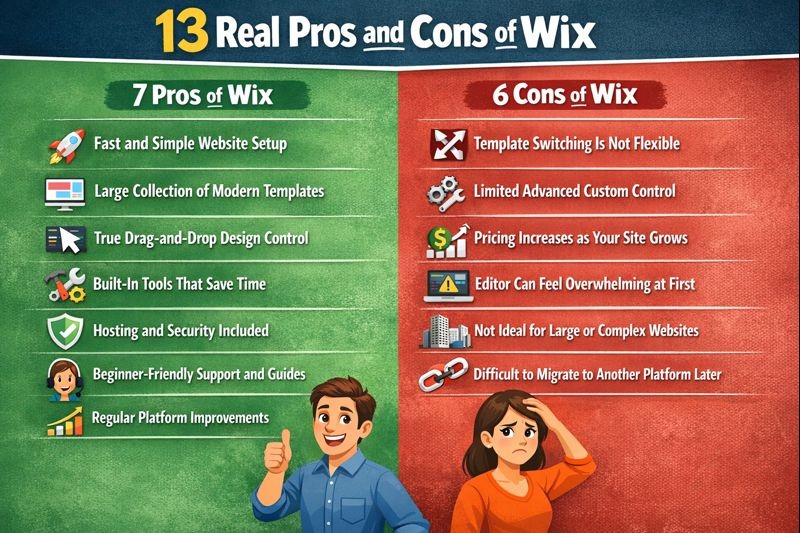
13 Real Pros and Cons of Wix
Below is a clear, balanced, and expanded breakdown of how Wix performs in real-world use. Each point explains what users actually experience after building, managing, and running a site over time, not just during the first setup.
7 Pros of Wix
These advantages explain why many users chose Wix in 2026. Each benefit focuses on ease, design freedom, time savings, and practical tools that support real websites and everyday business needs.
1. Fast and Simple Setup
Speed is one of the biggest reasons people choose Wix, especially when time matters and technical help is limited.
Quick site launch: You can publish a clean, fully working website in a single day. This is ideal for new businesses, personal brands, events, or time-sensitive projects that cannot wait weeks to go live.
Step-by-step onboarding: The setup process asks clear questions about your goals, industry, and site type. Based on your answers, the system suggests layouts, pages, and features that fit your needs.
Pre-built page structure: Important pages like Home, About, Services, and Contact are created automatically, saving setup time and reducing planning stress.
No learning curve for basics: Editing text, images, and buttons feels natural from the first session. Actions like clicking, dragging, and resizing work as expected.
Instant visual feedback: Every change appears immediately, which helps beginners avoid mistakes and build confidence quickly.
This fast and friendly setup makes the platform especially attractive for users who want results without technical barriers.
2. Large Template Library
A strong template system gives users a solid starting point, and Wix does this well. Instead of beginning with a blank page, users can choose a design that already fits their purpose, then shape it to match their brand.
Industry-based templates: Ready-made designs exist for shops, services, blogs, events, portfolios, restaurants, and personal sites. Each template includes pre-built sections that reflect how real visitors expect those sites to look and work.
Purpose-driven page layouts: Templates often include home pages, about sections, contact areas, and service blocks, which reduces planning time and speeds up publishing.
Modern design standards: Templates follow current layout trends, clean spacing rules, and readable font styles that look professional and trustworthy in 2026.
Consistent visual structure: Colors, headings, and spacing stay balanced across pages, helping sites feel polished even after edits.
Editable sections: You can adjust colors, fonts, images, backgrounds, and section layouts without breaking the overall design structure.
Brand-friendly customization: Logos, brand colors, and font choices can be applied across the entire site with a few clicks, keeping design consistent as the site grows.
This large and flexible template library makes Wix especially useful for users who want a professional look without hiring a designer.
3. True Drag-and-Drop Editing
Layout freedom is one of the main reasons many users stay with Wix long term. The editor gives you direct control over how each page looks, without forcing technical rules or rigid structures.
Pixel-level placement: Elements such as text, images, buttons, and sections can be moved exactly where you want. You are not limited to fixed rows or strict boxes, which allows for more creative layouts.
Live preview while editing: What you see inside the editor is the same as what visitors see on the live site. This reduces design errors and saves time spent on corrections.
No forced layout rules: You are free to design pages without being locked into columns or grids, unless you choose to use them for structure.
Easy resizing and alignment: Elements can be resized, aligned, and layered with simple mouse actions, making fine adjustments easy even for beginners.
Section-based organization: Pages are divided into sections that help keep layouts clean while still allowing full control.
This level of visual control makes building and adjusting pages feel natural and helps users create designs that match their exact vision.
4. Built-In Features Save Time
One of the biggest strengths of Wix is that many essential tools are already included. Users do not need to search for extra services or handle complex setups. This saves time and reduces mistakes, especially for beginners and small teams.
Contact and inquiry forms: Forms work instantly after adding them to a page. Messages go directly to your site dashboard and can also be sent to your email. You can collect names, emails, phone numbers, and custom questions without technical setup.
Booking and scheduling tools: These tools are ideal for salons, coaches, consultants, and service-based businesses. Clients can book appointments online, choose available time slots, and receive automatic confirmations.
Basic online store options: Small shops can list products, track inventory, manage orders, and accept payments in one place. This works well for simple stores without the need for outside systems.
Blog and content tools: Writing posts, adding images, and organizing categories is straightforward, making regular updates easy.
Marketing and email tools: Built-in options help send updates, promotions, and reminders without extra platforms.
Together, these features help users focus on running their business instead of managing tools.
5. Hosting and Security Included
One of the biggest advantages of Wix is that hosting and security are included by default. Users do not need to research hosting providers, install software, or manage technical settings. Everything runs in the background, allowing site owners to focus on content and business growth instead of maintenance tasks.
Automatic updates: The system updates itself without user action. New features, improvements, and fixes are applied automatically, reducing the risk of errors or outdated tools.
Built-in security protection: Safety features work quietly in the background to protect sites and visitors. This helps prevent common issues and keeps user data secure.
Reliable site performance: Pages load consistently for normal traffic levels, which improves user experience and builds visitor trust.
No manual backups required: Site data is saved automatically, lowering the risk of content loss.
Managed hosting environment: Server performance and uptime are monitored by the platform, so users do not need technical knowledge to keep their site running smoothly.
6. Helpful Support and Learning Resources
Support is designed for users who do not have technical experience. The goal is to help people solve problems quickly without feeling confused or overwhelmed.
Written guides and videos: Step-by-step articles and short videos explain tasks using simple words. Each guide focuses on one action at a time, such as editing text, adding pages, or connecting a domain.
Searchable help center: The help library is well organized, making it easy to find answers by typing a question. Most common issues, like layout changes or form setup, include clear visuals and practical examples.
In-editor tips and prompts: Helpful hints appear while you work, guiding you through features without interrupting your flow.
Customer support access: Paid plans include direct support when self-help guides are not enough. This is useful for urgent issues or setup problems that need personal assistance.
These resources reduce frustration and help users stay confident while managing their sites.
7. Ongoing Improvements
One reason many users continue to choose Wix is its steady improvement over time. The platform does not stay static. Instead, it updates tools, fixes weak points, and adapts to how people actually build and manage websites.
Better mobile editing: Mobile layouts can be adjusted separately from desktop views. You can resize text, move sections, and hide elements on mobile without breaking the main design.
Faster editor performance: The editor now loads quicker and feels smoother, even on sites with many pages, images, or apps. This reduces frustration during long editing sessions.
Feature updates each year: New tools and refinements are released regularly, based on real user feedback and usage patterns rather than trends.
Improved design tools: Spacing controls, layout sections, and font settings are easier to manage, helping users create cleaner pages.
More stable site management: Background updates improve reliability, reduce errors, and keep sites running smoothly without user action.
These ongoing improvements help ensure the platform remains practical and competitive in 2026, especially for users who want ease, stability, and steady progress without technical work.
6 Cons of Wix
While Wix offers strong ease of use and design freedom, it also has clear limits. These drawbacks matter depending on your long-term goals, site size, and level of control you expect.
1. Template Switching Is Not Flexible
When using Wix, design decisions made early tend to stay locked in. This is not a problem for static sites, but it can limit flexibility for growing or changing brands.
No direct template switching Once your site is live, you cannot simply apply a new template. Changing the design means rebuilding pages manually using a new layout.
Time loss during redesigns Major visual updates can take hours or even days, especially if the site has many pages, images, or sections.
Risk for growing brands Businesses that refresh their branding, colors, or layout style often may find this process slow and frustrating.
Extra planning required Users need to think long-term before choosing a template to avoid future rebuild work.
This limitation makes early planning especially important when building a site intended to grow or evolve.
2. Limited Advanced Custom Control
This limitation becomes more noticeable as a site grows or becomes more complex. While the platform works well for standard websites, users who want deep control may feel restricted over time.
No full server access You cannot manage hosting settings, databases, or server-level configurations. This means advanced performance tuning and custom backend changes are not possible.
Restricted customization scope Advanced site behavior depends on built-in tools. If a feature is not available, creating custom solutions can be difficult or impossible.
Best for standard use cases Business sites, blogs, and portfolios work well, but complex systems with unique workflows may not fit smoothly.
Limited flexibility for developers Users with technical experience may feel constrained by platform rules and fixed structures.
This is not a flaw for beginners, but it matters for users planning advanced or highly customized projects.
3. Pricing Increases as Needs Grow
Pricing is reasonable at the start, but costs can rise as your site expands and requires more features. This is important to consider if you plan long-term growth.
Feature-based upgrades Extra storage, advanced business tools, and online selling features are only available on higher plans, which increases monthly costs.
Long-term cost impact Monthly payments may seem small, but over several years, they can exceed the cost of more flexible platforms.
Less cost-effective for large sites Bigger websites with many pages, products, or team members often need premium plans, making the platform less budget-friendly at scale.
Add-ons increase expenses Some extra apps and features come with separate fees, which can raise overall costs.
Understanding these limits helps users choose a plan that fits both current needs and future goals.
4. Editor Can Feel Overwhelming at First
The same flexibility that gives users freedom can feel confusing in the beginning. While the editor is powerful, it presents many tools at once, which may slow down first-time users.
Busy interface New users see many menus, icons, and settings on the screen, which can feel crowded during early sessions.
Learning layout freedom takes time Full drag-and-drop control means there are fewer rules. Beginners may struggle at first with spacing and alignment.
Initial confusion possible Without prior experience, some users need a short adjustment period before feeling confident.
Better with practice After a few edits, most users understand the layout flow and work faster with less effort.
This learning phase is usually short, but it is important to expect it when starting out.
5. Not Ideal for Large or Complex Websites
While Wix works well for many users, it is not built for heavy or highly complex projects. As a site grows in size and structure, some limits become more noticeable.
Best for small to medium sites Websites with many pages, large media libraries, or frequent updates may start to feel slow or harder to manage.
Limited performance tuning options Advanced speed control, deep caching settings, and custom performance adjustments are minimal compared to more flexible systems.
Less suited for complex workflows Multi-layer setups, advanced user roles, or custom logic across many pages may not work smoothly.
Scaling challenges over time What works well for a small site may feel restrictive as traffic, content, and features increase.
Because of these limits, the platform is best chosen with realistic growth expectations in mind.
6. Difficult to Migrate Away Later
This limitation matters most for users who think long-term. Planning ahead is important because once a site grows, moving it can take significant time and effort.
Limited export options Full site layouts, design elements, and structure cannot be exported in one piece. Only basic content, like text, may be reused.
Platform dependency Your site is built around the platform’s editor, features, and system rules, which do not transfer to other builders.
Rebuilding may be required Moving to another platform often means recreating pages, designs, and settings from scratch.
Higher transition cost Time, effort, and possible downtime increase when migration is delayed until the site is large.
For users who expect major growth or future platform changes, this limitation should be
Design Quality and User Experience with Wix
Design quality remains one of the strongest reasons people choose Wix. The platform focuses on visual clarity and ease of use, which helps users create professional-looking sites without design experience.
Clean layouts Templates use balanced spacing, readable fonts, and clear sections, so pages look polished even with minimal customization.
Consistent visual control Colors, fonts, and section styles stay uniform across pages, which helps maintain a strong brand look.
Easy navigation setup Menus, page links, and dropdowns are simple to manage through a visual panel, making site structure easy to adjust.
Mobile-friendly results Sites adapt well to phone screens, and mobile layouts can be fine-tuned for better readability and tap-friendly navigation.
Positive visitor experience Pages are easy to read, scroll smoothly, and load reliably, which helps build trust and keep visitors engaged.
SEO Performance of Wix in 2026
Search visibility with Wix has improved steadily over the years, making it a practical option for small and mid-sized websites that rely on organic traffic.
Built-in SEO guidance The platform explains what to fill in, where to add text, and why it matters, using clear language instead of technical terms.
Editable page titles and content Users can easily control page titles, descriptions, headings, and on-page text to match search intent.
Clean page structure Pages follow a readable structure that search engines can understand without extra setup.
Good results for small sites Local businesses, service pages, and blogs can rank well when content is helpful, clear, and updated regularly.
Reliable foundation for growth While advanced users may want deeper control, most users get solid and consistent results without extra tools.
For users focused on clarity and steady growth rather than advanced technical tuning, Wix provides a dependable SEO base in 2026.
Pricing and Value for Money with Wix
Understanding the real cost of Wix matters before you decide if it is worth it for your project. Pricing depends on what you want the site to do, how big it will be, and how professional you want it to look. Wix offers free options plus a range of paid plans that scale with needs and features.
Free Plan – $0/Month
Starter access – Build and publish a site with templates and tools.
Limits – You get a Wix subdomain (like yoursite.wixsite.com) and Wix branding on your site.
Use case – Good for testing ideas, personal projects, or learning.
Core Paid Plans (Best Value for Most Users)
These are the standard plans most people choose. Prices below are based on annual billing (discounted) and reflect common 2026 offerings:
Light Plan – ~$17/month
Removes Wix ads
Connect your own domain
Basic marketing tools
Great for personal sites and small brochure websites
Core Plan – ~$29/month
Ideal starting point for business
Basic ecommerce features
Larger storage (e.g., 50GB) and improved tools
Accept online payments and bookings
Business and Advanced Plans
If you need more advanced features, ecommerce, or team collaboration:
Business Plan – ~$39–$43/month
Enhanced ecommerce
More storage and tools
Better marketing and SEO additions
Business Elite Plan – ~$159/month
Unlimited storage
Support for large teams
Advanced analytics and developer features
Best for bigger companies or complex operations
What You Get for Your Money
Hosting Included – No separate hosting bills or tech setup.
Free Domain for 1 Year – With premium plans, you get a domain included initially.
14-Day Money-Back Guarantee – Try a paid plan and get a refund if you change your mind.
Time Savings – Because everything is bundled and visual, you save hours setting up features you would normally build manually.
For many users, especially small businesses, creators, and local brands, the time saved and included tools justify the cost. However, larger operations with bigger budgets should compare advanced needs before choosing a plan.
Summary of Value
Overall, Wix offers clear pricing tiers that match different user goals, from basic sites to professional ecommerce and business management. When you factor in hosting, security, tools, and ease of use, many users find the investment worthwhile, especially when paid plans include helpful extras without needing plugins or outside services.
Who Should Choose Wix and Who Should Not
Choosing the right website builder early helps avoid wasted time, money, and frustration later. Wix works very well for some users, but it is not the best fit for everyone. The key is matching the tool to your real goals.
Choose Wix If
Wix is a strong choice when ease and speed matter more than deep technical control.
You want to launch quickly Ideal if you need a website live fast for a business, event, or personal project.
You prefer visual control You like seeing and adjusting your layout directly on the screen without code.
You manage your site alone Perfect for solo owners who do not want to rely on developers or designers.
You want built-in tools Contact forms, booking systems, blogs, and basic stores work without extra services.
You value simplicity over complexity Daily updates, edits, and content changes stay easy and stress-free.
Avoid Wix If
Some goals require more flexibility than the platform offers.
You need deep technical control Full server access, custom systems, or advanced backend work are limited.
You plan massive growth Very large websites or complex operations may outgrow the platform.
You expect frequent redesigns Template lock-in makes major design changes time-consuming.
You want an easy migration later Moving a full site to another platform is difficult.
Matching the tool to your goal matters more than trends. When used for the right purpose, Wix can be reliable and efficient. When expectations do not match its strengths, frustration can follow.
Final Thoughts: Is Wix Worth It in 2026?
Wix is still worth considering in 2026 for people who want a clear, reliable way to build and manage a website without technical stress. It works especially well for small businesses, freelancers, bloggers, and beginners who value speed, design control, and built-in tools that reduce setup time.
While it does have limits in advanced control and long-term flexibility, it delivers real value when used for the right goals. If your needs align with simplicity, visual editing, and steady growth, Wix remains a smart and dependable choice.
Have a project in mind?
Schedule a discovery call today to discuss things in more depth.





.svg)
.svg)
.svg)
.svg)
