
Webflow AI is reshaping how website owners understand performance and improve their sites. Instead of guessing what search engines or users want, site owners can now see practical signals, clear guidance, and realistic next steps. This shift matters because modern search rewards clarity, usefulness, and intent, not volume or tricks.
Growth happens when a website communicates clearly and serves people well. Pages must explain their purpose, guide readers smoothly, and remove friction. Our article will explain how AI inside Webflow supports audits, improves content quality, and encourages steady growth without shortcuts or risk.
What Webflow AI Is and Why It Matters
Webflow AI is designed to support smarter website decisions by reviewing content and structure through a practical lens. It does not chase trends or manipulate systems. Instead, it focuses on how pages read, how ideas connect, and how well a site explains itself to real people.
This matters because search engines have changed. They now reward pages that feel useful, complete, and honest. Sites that confuse users or lack focus struggle to grow. AI inside Webflow helps identify these issues early, before they reduce trust or visibility.
To understand its value more clearly, here is what this approach actually helps with:
- Clear page intent
It helps ensure each page has one clear purpose and stays focused from start to finish. - Stronger content flow
It highlights areas where ideas feel disconnected or hard to follow and guides a smoother structure. - Better user understanding
Content becomes easier to read, which keeps visitors engaged longer. - Early problem detection
Weak sections are spotted before they impact rankings or credibility.
Another reason it matters is efficiency. Many site owners lack time or a large team. Clear guidance reduces wasted effort and helps focus attention on changes that actually help users rather than cosmetic edits.
How Webflow AI Audits Your Website
Every strong website starts with understanding what works and what does not. Webflow AI performs audits by reviewing content and layout in a way that mirrors real use.
Audits are not about fault-finding. They are about awareness. When you know where problems exist, improvement becomes intentional rather than random.
Page Structure and Clarity Checks
Structure shapes understanding. When pages feel scattered, readers leave. During audits, the system examines how information is arranged.
It checks for:
- Headings that fail to explain what follows
- Sections that repeat ideas without adding value
- Pages that lack a clear main topic
These insights help site owners fix confusion without redesigning everything. Small adjustments often produce large clarity gains.
Content Relevance Signals
Relevance is central to trust. Webflow AI checks whether the content answers the question a visitor likely has when landing on a page.
It highlights:
- Pages that drift away from their original purpose
- Content that feels too short to be helpful
- Sections that add words but not meaning
This keeps content aligned with intent, which is critical for stable rankings.
How Webflow AI Optimizes Content and Structure
Once weak areas are clear, improvement becomes focused. Webflow AI supports optimization by encouraging better structure, smoother flow, and clearer explanations.
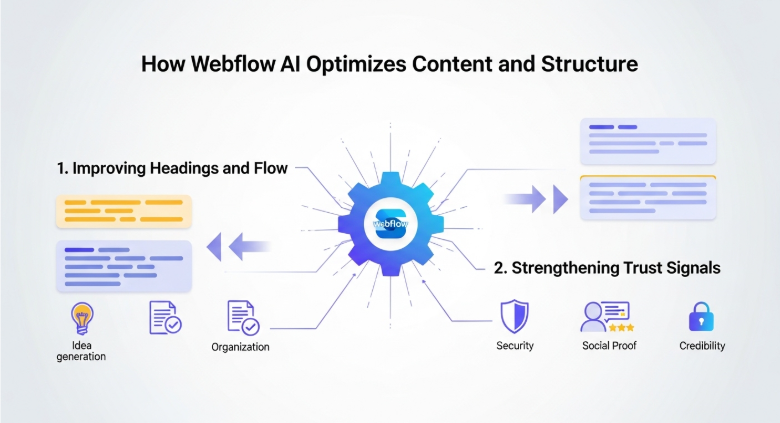
Optimization here is not about forcing keywords or changing voice. It is about making content easier to read and easier to trust.
Improving Headings and Flow
Headings guide attention. When they work, readers move naturally through content. When they fail, pages feel heavy.
The system helps by suggesting:
- Clear topic hierarchy
- Logical order between sections
- Balanced spacing between ideas
This improves engagement without rewriting entire pages.
Strengthening Trust Signals
Trust is built through clarity and consistency. Webflow AI encourages content that explains rather than persuades.
It supports trust by highlighting:
- Areas that need clearer explanations
- Claims that lack supporting detail
- Sections where tone feels inconsistent
This aligns content with expectations from search engines and readers alike.
How Webflow AI Supports Site Growth
Growth does not come from sudden spikes or short bursts of traffic. It comes from repeated small improvements made over time. Webflow AI supports this process by keeping attention on what already works and helping you improve it further instead of starting from scratch.
Rather than chasing trends or quick tactics, it promotes steady progress. This approach builds stronger pages, clearer structure, and better user understanding, which leads to more reliable growth.
Better Content Decisions Over Time
As a site grows, patterns begin to appear. Some pages attract attention and keep users engaged. Others struggle to perform or lose relevance. The system helps identify why this happens by highlighting differences in structure, clarity, and focus.
It allows you to:
- Replicate strong page structure
Successful layouts and content flow can be reused across similar pages. - Update older content with confidence
Instead of guessing, updates are guided by what already works. - Improve weak pages using proven signals
Changes are based on clarity and usefulness, not assumptions.
This prevents random edits that often reduce consistency and damage performance over time.
Search Visibility Without Risk
Search engines actively penalize shortcuts and low-value content. Webflow AI avoids risky behavior by keeping optimization focused on clarity, relevance, and usefulness.
This approach helps sites grow in competitive markets like the USA and UK by aligning content with long-term ranking systems rather than temporary loopholes or trends that fade quickly.
Real Benefits for Teams and Solo Builders
Not every site has a large team or dedicated editors. Webflow AI works well for both individuals and groups by simplifying decisions and reducing uncertainty.
Instead of overwhelming users with options, it helps narrow focus to what truly matters.
Benefits include:
- Clear priorities instead of endless options
It becomes clear which issue to address first and how it affects results. - Less time spent guessing what to fix
Guidance replaces trial and error. - Better alignment between content and intent
Pages stay focused on serving users, not just filling space.
This makes steady improvement realistic even with limited time, skills, or resources.
How Webflow AI Helps Maintain Content Quality
Content quality often drops as websites grow. New pages are added quickly, older content is left behind, and tone becomes inconsistent. Webflow AI helps prevent this by encouraging consistency across all pages, even as content expands.
Highlighting gaps and uneven sections, it helps teams maintain a clear standard instead of relying on memory or manual checks.
It helps teams:
- Maintain tone across pages
Content stays consistent, so readers feel they are on the same site throughout. - Avoid thin or repetitive content
Pages are encouraged to add value instead of repeating the same ideas. - Keep explanations complete
Important topics are covered clearly without leaving readers confused.
Consistency supports trust, and trust directly affects how both users and search engines judge a site.
How Webflow AI Fits Editorial Workflows
Editorial control matters, especially for growing websites. Webflow AI fits into existing workflows without disrupting how teams already work.
Instead of forcing new processes, it supports thoughtful review and improvement at each stage.
It supports:
- Draft reviews before publishing
Potential issues are spotted early, reducing the need for later fixes. - Updates to existing content
Older pages can be refreshed while keeping the structure intact. - Clear reasoning behind edits
Teams understand why changes are suggested, which improves collaboration.
This clarity reduces confusion and helps teams work faster with fewer revisions.
How Webflow AI Aligns With Google E-E-A-T
Search engines value experience, expertise, authority, and trust more than ever. Webflow AI supports these values naturally, without forcing artificial signals or scripted content.
It helps by:
- Encouraging real explanations
Content focuses on clarity instead of vague statements. - Supporting logical structure
Pages are easier to follow, which improves understanding. - Promoting transparency
Clear communication builds confidence with readers.
When credibility grows naturally, search visibility becomes more stable and sustainable.
Common Mistakes It Helps You Avoid
Many websites struggle not because of one major failure, but due to repeated small errors that build up over time. Webflow AI helps prevent these issues by drawing attention to problems before they affect users or search visibility.
It helps avoid:
- Publishing pages without a clear intent
Pages are guided to focus on one purpose, reducing confusion for readers. - Overloading content with filler
Extra words without meaning are identified, helping keep content useful and direct. - Ignoring structure during updates
Changes are made carefully so page flow and clarity stay intact.
Avoiding these mistakes protects both rankings and reputation, which are difficult to recover once lost.
Why Webflow AI Encourages Long-Term Thinking
Short-term wins often create long-term problems. Quick tactics may bring brief attention, but they rarely build trust. Webflow AI promotes sustainable improvement by keeping decisions grounded in user needs.
It keeps focus on:
- User understanding
Content explains ideas clearly instead of trying to impress. - Clear communication
Pages say what they mean without unnecessary complexity. - Honest structure
Information is organized in a way that feels natural and complete.
This approach aligns with how modern search systems evolve and rewards websites that grow steadily rather than chasing quick results.
Final Thoughts
Webflow AI supports growth by improving understanding, not by automating decisions or removing human control. It helps site owners see their content clearly, understand what works, and make informed improvements over time.
When pages explain themselves well, users stay longer and feel more confident. By focusing on clarity, usefulness, and consistency, this approach supports lasting success instead of short-term gains.
Frequently Asked Questions (FAQs)
What makes Webflow AI different from other tools?
Webflow AI focuses on clarity and usefulness instead of shortcuts or heavy automation. It helps improve how content is structured and explained, rather than trying to manipulate rankings.
Does Webflow AI follow Google’s latest guidelines?
Yes. It aligns with current ranking systems that prioritize trust, relevance, and helpful content, which matches Google’s latest core updates.
Can Webflow AI help older websites?
Yes. It is especially useful for improving existing content by identifying unclear sections and helping update pages without breaking structure.
Is Webflow AI suitable for beginners?
Yes. The guidance is simple, practical, and easy to apply, even for users without technical or writing experience.
Does Webflow AI help with international rankings?
Yes. Clear structure and understandable content benefit users across regions, including the USA and UK.
Can teams use Webflow AI collaboratively?
Yes. It supports shared workflows by providing clear reasoning behind changes, which helps teams stay aligned and consistent.




.svg)
.svg)
.svg)
.svg)
